Run small jobs and big projects from one app.
Schedule your crew, build estimates, document the work, manage multi-phase projects, invoice, and get paid — $39 per month for up to 10 people.
- Up to 10 people on one flat bill — no per-seat fees
- Optional project tracking for multi-phase work
- 14-day free trial, no card, cancel anytime
No credit card required. Setup takes minutes.
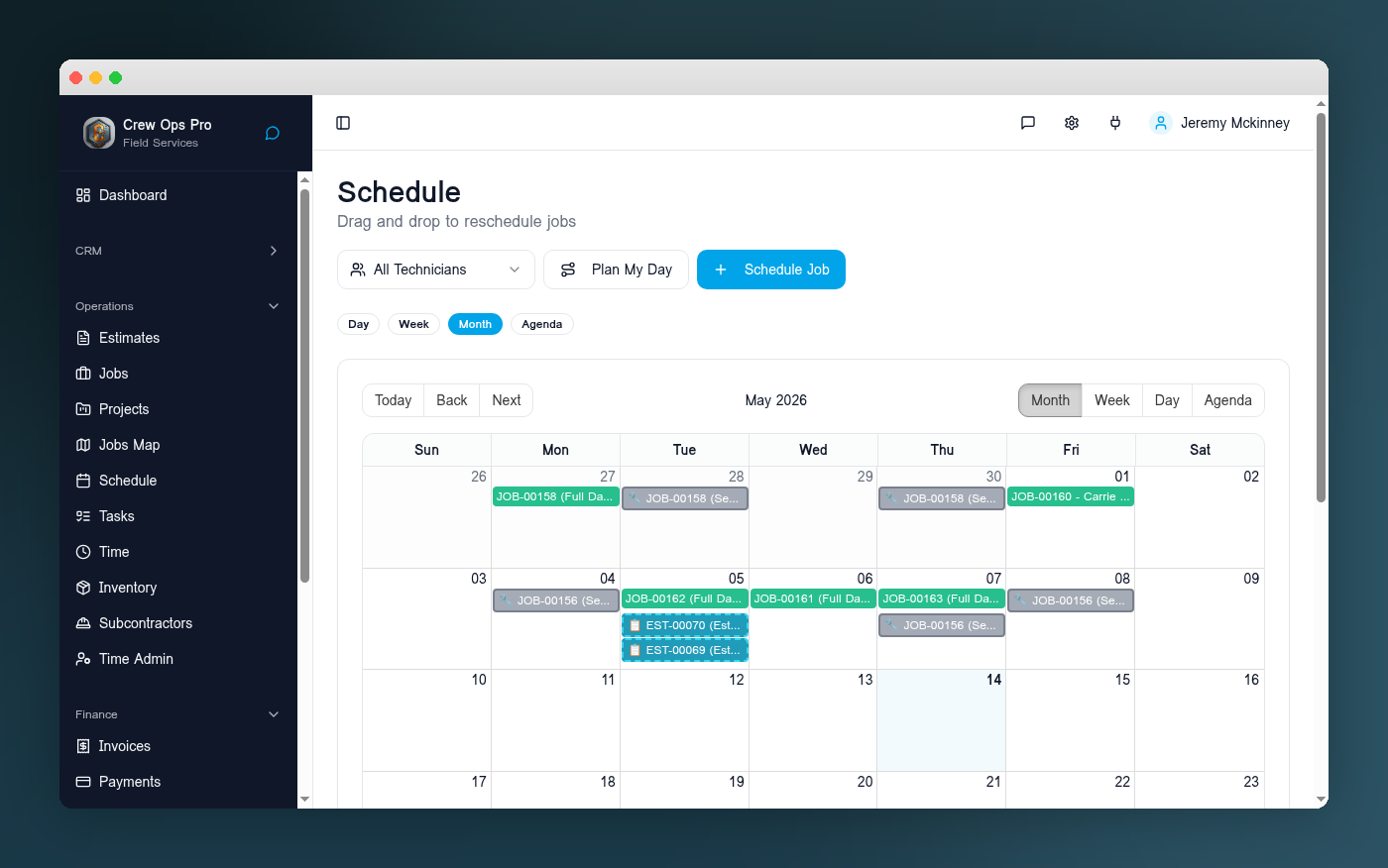
Real screen, real jobs
This is my actual schedule. I run a GC crew in Dallas on it every day.
Built and used daily by a working contractor
Jeremy McKinney · Creative Constructors · Dallas, TX
- $39/mo
- Flat, up to 10 users
- 14 days
- Free trial, no card
- $0
- Setup & onboarding
- No
- Contract or lock-in
Not a startup guy. A GC who still swings a hammer in Dallas.
I built this for my own crew first.
I'm Jeremy McKinney. I run Creative Constructors, a general contracting business out of Dallas, Texas. I bounced through Jobber, Housecall Pro, and Workiz — five, six months each — and every one of them cost $200+ a month while still missing something I needed on the job.
So I built CrewOpsPro to run my own jobs. It schedules my crew, sends my estimates, and collects my money every day. Everything you see on this site is the software I depend on to get paid — not a demo built for a sales deck.
If it doesn't work on a tailgate at 7pm with one bar of service, it doesn't ship.
- Trade
- General contracting
- Based in
- Dallas, TX
- Uses CrewOpsPro
- Every single day
One system for every kind of work.
A same-day service call and a six-week remodel don't need two different tools. Run the quick stuff simply, and turn on project tracking only when a job actually needs it.
Small service job
In and out the same day
- Schedule it on the right day, with the right tech
- Dispatch to the crew's phone with address and notes
- Complete the work — photos, notes, materials, time
- Invoice straight off the finished job
- Collect payment by card or ACH
Larger project
Multi-phase work over weeks
- Break the job into phases with their own dates
- Timeline view for what's happening and what's next
- Procurement — order, track, and receive materials
- Cost codes so labor and materials land in the right bucket
- Daily logs from the field, with photos
- Progress billing and per-project financials
Project tracking is optional. Most jobs never need it — turn it on for the ones that do.
Watch a real job go from phone call to scheduled work.
A real job getting created in CrewOpsPro — customer, address, line items, crew assignment, and a slot on the schedule. No tab-hopping. No "where did that go?"
From first call to money in the bank.
The same seven steps run a $300 service call and a $60,000 remodel. You just use more of them on the bigger job.
Client and property history
Every customer keeps a permanent record — addresses, equipment, past jobs, photos, and notes you can pull up mid-call.
Estimate and e-signature
Build a quote from reusable line items, attach photos, send it, and get it signed without a second trip.
Scheduling and field execution
Drag the job onto the right person and day. The crew sees it on their phone with the address, scope, and checklist.
Optional project tracking
For multi-phase work: phases, timeline, procurement, cost codes, daily logs, and project financials. Off by default.
Change orders and documentation
Field notes, photos, time, and materials attach to the job. Scope changes get written down and approved.
Invoice, payment, profitability
Deposits, progress payments, and final invoices. Card and ACH. Then see what the job actually made.
Client portal and communication
Customers book, message, pay, and follow project updates from a branded portal instead of calling you.
What a 5-person crew pays each month.
Monthly, no-commitment list prices. No annual-prepaid discounts mixed in.
CrewOpsPro
$39/mo
One plan · up to 10 users
Monthly, no commitment. Every feature included.
Jobber
$199/mo
Connect plan · 5 users included
Monthly, no commitment. Extra users $29/mo each.
Last verified September 2026 · source
Housecall Pro
$189/mo
Essentials plan · 5 users included
Monthly, no commitment. Extra users $100/mo each.
Last verified September 2026 · source
Competitor prices are monthly, no-commitment list prices published on each vendor's own pricing page. Plans, included users, and features change — check the source before you decide. See the full comparison
What your crew size actually costs.
Drag the slider. We use each vendor's published monthly, no-commitment price and their published per-extra-user rate.
Difference per year with CrewOpsPro vs.
Jobber
$816
Housecall Pro
$1,800
Last verified September 2026. Competitor prices are monthly, no-commitment list prices published on each vendor's own pricing page. Plans, included users, and features change — check the source before you decide. Sources: Jobber pricing · Housecall Pro pricing.
One plan. One price.
$39/month, flat, for up to 10 people. Service jobs and project tracking both included. Card processing at standard rates — no markup from us.
- Up to 10 team members included
- Project tracking included, optional per job
- No setup fee, no contract
- 14-day free trial, no card
 CrewOpsPro
Everything you need. No upsells, no per-user fees.
No credit card required. Setup takes minutes.
Frequently asked questions
- $39 per month, flat. That's the whole price — for up to 10 team members, every feature included. No setup fee. No annual contract. 14-day free trial, no card required.
- Yes. Quick service calls run as ordinary jobs — schedule, dispatch, complete, invoice, collect. When a job is bigger, you turn on project tracking for phases, timeline, procurement, cost codes, daily logs, and project financials. Project tracking is optional; most jobs never need it.
- Yes — up to 10 team members are included. If you grow past that, we'll talk; we don't want to surprise you with a per-seat bill mid-year.
- Use CrewOpsPro on iPhone, iPad, Android, or desktop. Install it to your home screen for fast field access.
- Yes — customers, jobs, and invoices come in via CSV. Most teams are migrated and live within a day or two.
- Yes. Every customer gets a private portal to view estimates, approve work, message you, follow project updates, and pay invoices. You can brand it.
- Standard card processing rates apply (we use Stripe under the hood). CrewOpsPro itself doesn't add a markup.
Ready to run a tighter operation?
Start your 14-day free trial. No credit card required. Setup takes minutes.
$39/mo flat · No contracts · Cancel anytime